What's New
Everything shipped to Rank-Hub and your AI SEO consultant, newest first.
Edit the Pages a Change Is Measured On
Mid September 2026A tracked change in Analytics now has an Edit pages form, so you decide which URLs its before and after is measured on, including for a change that had none. The query breakdown below the chart also switches between clicks and impressions.
Copy a Traffic Opportunity for Your Coding Agent
Mid September 2026Copy for Coding Agents on any traffic opportunity puts the whole thing on your clipboard as markdown, ready to paste into Claude Code, Cursor or whatever builds your site. The arrow beside it copies the traffic opportunity together with your chat about it.
Published Articles Follow the Live Page
Mid September 2026Once an article has a live URL, your CMS is where it gets edited. Rank-Hub keeps a read-only copy of the live page, refreshed before each run or right away with Refetch now, so your consultant always works from what is actually published.
Topic Clusters That Track Themselves
Mid September 2026A cluster turns active on its own once an outline is started or a page goes live in it. When every article in it is live, your consultant checks in and can close it with you. Mark done, Archive and Reopen sit on the cluster page.
Park an Objective
Mid September 2026Given up on a bet? Park this objective on the Objectives page stops new work on it and frees its slot. You give a reason, your consultant respects it, and its predictions keep being measured.
Tell Your Consultant What's Live
Early September 2026Shipped planned articles yourself? Tell your consultant they're live and it records each URL, which starts tracking the impact of that page.
A Note From Your Consultant on Home
Early September 2026Home opens with a short note from your consultant on where your site stands, followed by up to four next steps, each with the time it takes.
Regenerating an Article Outline
Early September 2026Regenerate in the draft editor asks your consultant to write the outline again from scratch. It first asks what should be different, and the old version is kept so you can compare.
Move Articles Between Clusters
Early September 2026An article can now move to another cluster from the Cluster picker on its page, and a standalone draft can be filed into a cluster to become part of it.
Search Results and Keyword Demand in Chat
Late August 2026Ask what a page is up against, or whether a term is worth writing for, and your consultant pulls the live Google results and the demand behind them mid-conversation.
Better First Session Onboarding
Mid August 2026Your first session with the AI consultant drops you into the app: your strategy, the Content Map, one worked-out traffic opportunity with the findings under it, an article written for your site, and your Knowledge Base. A short walk-through shows you around.
Reviving Archived Conversations
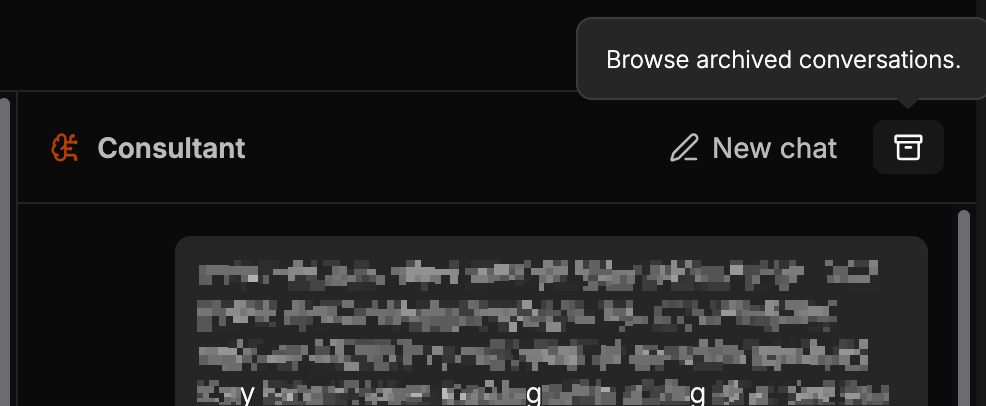
Mid August 2026Starting a new chat used to delete the conversation you were in. It gets archived now instead. The archive button beside New chat lists your past threads with a date and the last thing said, and clicking one makes it the active conversation again. Nothing you worked through with your consultant is thrown away just because you wanted a clean slate.
See Your Global Site Performance
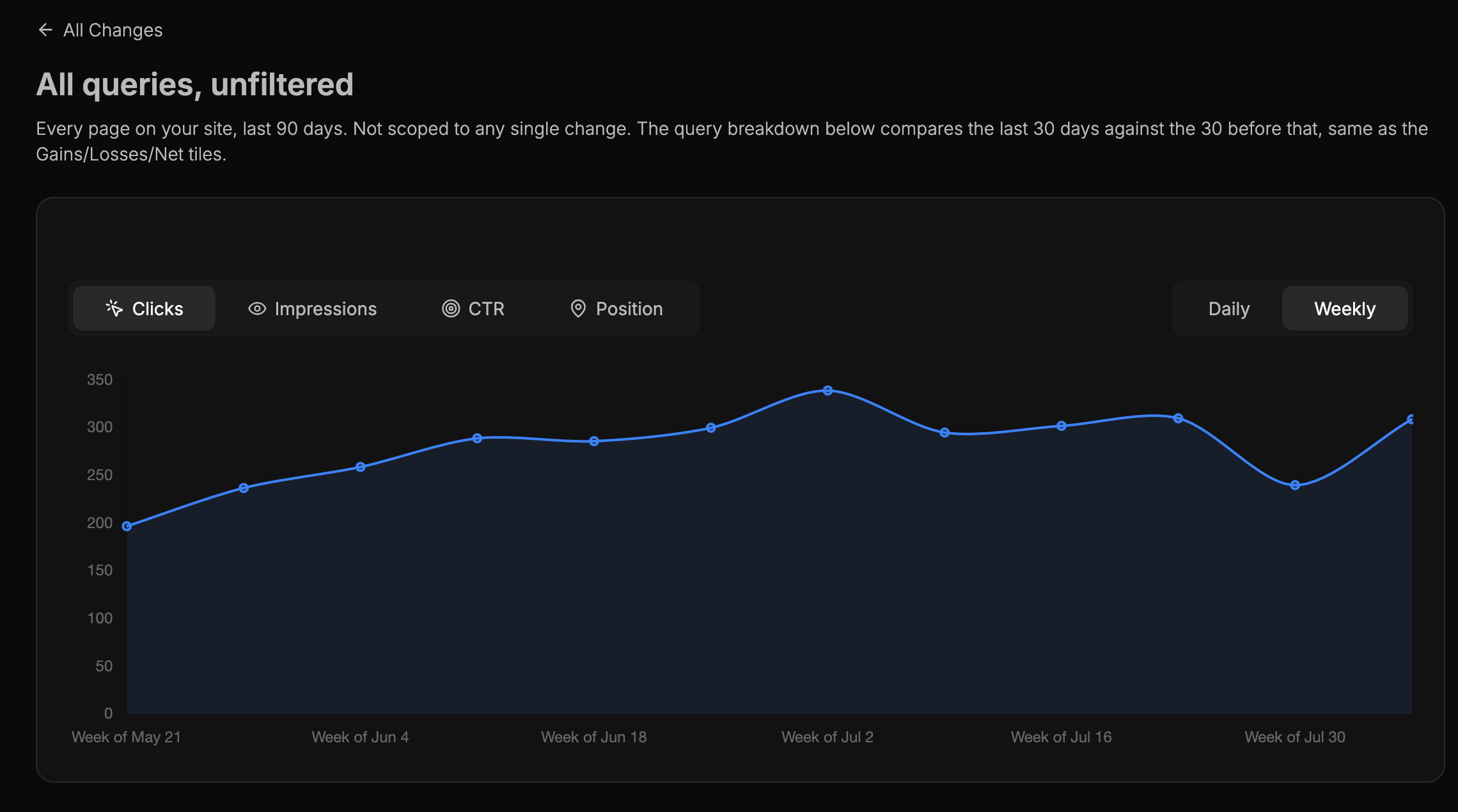
Early August 2026Analytics has a new All Changes view for the site as a whole: 90 days of clicks and impressions, the last 30 days measured against the 30 before, and the queries and pages behind the movement. The three summary tiles at the top of Analytics now link straight to it. It answers whether the site is moving overall, before you drop into a single change for its before and after.
Skipping a Traffic Opportunity Retires the Issue Too
Early August 2026Skipping a traffic opportunity now also retires the problem behind it, so the same recommendation doesn't come back around in a later run. Restore it from the skipped list and the problem comes back with it. Your consultant is also better at not writing two traffic opportunities for the same issue when it's working through several at once.
Credits Reset on Schedule
Early August 2026Your credits used to refill on the next run your consultant made, which meant a quiet week could leave the balance sitting where it was. They now reset on their own schedule regardless of what is running. The reset date in the sidebar and on the credit usage page is worked out the same way everywhere, so what you see is what you get.
See the Bets Behind Every Recommendation
Early August 2026Objectives spells out what your consultant is going after and what it expects to happen. Each objective carries predictions with real Search Console numbers: where the metric stood when the bet was made, where it stands now, and the difference, with the exact queries and pages being measured. Baselines are measured from your own data rather than stated, and every prediction gets a fixed observation window before it's judged, so a quiet week doesn't get read as a failure.
A Running Record of What Worked
Early August 2026The Ledger holds every call your consultant has made, when it made it, and how it turned out. Predictions that held, predictions that didn't, bets that got dropped and the reason why: nothing is deleted, so a few months in you have a record of what works on your site specifically rather than in general. The lessons it draws out of that record sit at the top of the page.
Your Business, Written Down
Early August 2026Your consultant keeps a written account of your business, and you can now read it. Business foundations covers how the site makes money, who actually converts, and what looks attractive but doesn't pay. Competitors lists the sites it treats as the benchmark for the searches you're going after. Both sit in the sidebar under Strategy, and what you tell your consultant in chat ends up there.
Analytics Matches Your Pages More Accurately
Late July 2026When you log a change, the pages you name are now matched against the URLs Search Console actually reports, including http and https, www, and trailing-slash variants. Before and after numbers no longer come up empty just because the URL was written slightly differently from the one Google has on file.
Strategy Runs Cost Fewer Credits
Late July 2026A strategy run costs 8 credits instead of 15. Your consultant now writes and submits traffic opportunities in a single pass rather than drafting them and then going back to refine them, so the same output costs roughly half of what it did. Your weekly allowance stretches further as a result.
Your Consultant Checks In
Mid July 2026Your consultant now starts conversations with you, not just the other way around. When something happens worth talking about, a check-in slides in from the left and it opens with a question. Skipping a traffic opportunity is the first one: instead of a form asking why, your consultant asks what didn't fit and works it out with you, then remembers the answer so future recommendations account for it. Check-ins are always free and never touch your credits.
The Trial Walk-Through
Mid July 2026The trial used to drop you at a list of traffic opportunities. This walked you through the whole loop instead: a win moment after your first completed traffic opportunity showing what you had just changed, and a closing summary once you'd worked through the queue. The first-week flow has since been rebuilt, so this is history rather than the current path.
Clearer Google Search Console Setup
Mid July 2026Connecting Search Console was the step people got stuck on, so onboarding spelled out exactly what to grant, linked to a setup guide, and let you fix permissions in another tab and retry without starting over. Search Console has since become optional, so this is history: you can start from your domain alone and connect Google whenever it suits you. Live chat is still there on every onboarding screen if you would rather just ask.
Delete a Tracked Change
Mid July 2026Changes logged in Analytics can now be deleted from the change's detail page. Useful when something got logged twice or a change was reverted and the before/after comparison no longer means anything. A confirmation step keeps you from removing tracked history by accident.
One Model, Nothing to Choose
Early July 2026The consultant chat used to ask you to pick between a faster model and a smarter one, and forgot your pick every session. The choice is settled now: it runs on one model with no setting to manage, so there's nothing to select and nothing to remember.
Upgrading Tops Up Your Credits Right Away
Early July 2026Moving from Pro to Scale no longer means waiting until your next cycle for the extra credits. The difference is added immediately, prorated for the time left in your billing period. Surfaces where you're running low on credits now also point you straight to the upgrade instead of leaving you to find it.
Edit Your Knowledge Base Directly
Early July 2026Knowledge Base entries are now written and edited in place, with no separate review queue to work through. Your consultant still adds what it learns as it goes, and you can correct or delete anything yourself at any time. Fewer steps between noticing something is wrong and fixing it.
Fixed: Wrong Site After Switching Accounts
Early July 2026Logging into a different account, or deleting a site you had selected, could leave you looking at a property you no longer have access to. The app now detects that and resets your selection cleanly instead of erroring out.
Your Knowledge Base Now Informs Research
Early July 2026What's in your Knowledge Base is read during strategy and research runs, not just during chat. Your consultant applies what it already knows about your business when it analyzes keywords and competitors, so recommendations arrive with your context already baked in rather than needing correction afterwards. Backlink research is part of the strategy run too.
Block Extra Domains When Scraping
Early July 2026Account now has a field for additional analytics and tracking domains to block while your consultant reads pages. The common ones are blocked already; this is for anything unusual on your stack that was slowing reads down or cluttering what your consultant saw.
Shared Credit Pool and Extra Sites
Early July 2026Credits are now a single pool shared across your whole subscription instead of being split per property: 125 a week on Pro, 250 a week on Scale. Spend them wherever the work is that week rather than watching one site's allowance go unused. You can also add extra properties to any plan for $19 a month each, charged prorated from the day you add them.
Site-Wide 30-Day Click Trends
Late June 2026Analytics now shows what your whole site gained and lost over the last 30 days, plus the net result, with percentage comparisons against the previous period. It's the view for answering whether the site is moving overall, separate from the per-change before and after breakdowns.
Set Your Writing Voice Once
Late June 2026There's now a writing voice panel where you describe the tone, style and rules your content should follow. Your consultant applies it every time it drafts, so you stop repeating the same corrections on every article. You can also refine a specific section rather than regenerating the whole piece.
Voice Dictation for Your Consultant
Late June 2026You can now speak to your consultant instead of typing. Hit the microphone button in the chat input, talk for as long as you need, then hit it again to stop. The transcript lands in the chat box, where you can edit it before sending.
Plan Your Topics on the Content Map
Mid June 2026There is now a dedicated section in the sidebar for planning content, since renamed to the Content Map. Create topic clusters, add articles to each cluster, track their status from idea to published, and paste in your live URL once it's up. Your consultant sees the full cluster context while you work inside an article, so its suggestions stay coherent with the bigger picture.
Notifications in the Sidebar
Early June 2026A bell icon now sits in the sidebar and lights up whenever something worth knowing has happened in the background, like your weekly strategy finishing or an outline completing. Open it to see what's new, and dismiss items when you're done.
Mark a Traffic Opportunity Done
Early June 2026You can now mark a traffic opportunity as complete right from its detail page. A dialog asks which pages the change affected, or lets you flag it as site-wide. That information flows straight into Analytics as a tracked Change, so the before/after impact is captured automatically.
Article Editor: Dark Mode and Word Count
Early June 2026The article editor now respects dark mode, and a live word count sits in the bottom bar as you write. Your cursor position is preserved when you switch away from the tab and come back.
Analytics: Monthly Click Trends With Percentages
Mid June 2026Analytics now shows monthly click totals alongside a percentage change. You can see at a glance which change improved your traffic most, or whether it moved at all, without doing the math yourself.
Team Invites and Billing
Mid June 2026If you joined Rank-Hub through a team invite, the billing page now shows that your subscription is covered by the account owner instead of asking you to subscribe yourself.
Analytics: See the Impact of Every Change
Early June 2026Every completed traffic opportunity is now logged as a Change with a before/after performance chart, so you can see what it actually moved. Your consultant can log manual changes too. Find both in Analytics.
Faster Consultant Responses
Early June 2026Your consultant now responds 3 to 4 times faster. We chose to pay higher prices for that speed, and it costs you nothing extra.
Progress Bar on Page Transitions
Late May 2026A slim progress bar now appears at the top of the screen during page transitions. Small thing, but you always know when the app is loading something instead of wondering whether your click registered.
Getting Started with Your Consultant
Late May 2026New users now see a gentle glowing prompt the first time they open the app with the consultant in view. It points you toward the chat without getting in the way. Dismiss it once and it stays gone.
Your Consultant Builds Your Knowledge Base
Late May 2026As your consultant works through your site, it adds things worth remembering to your Knowledge Base: how your business works, what you've already tried, decisions it should not relitigate. A badge in the nav shows when something new has landed. You stay in control of what sticks and can change or remove any of it.
Credits, and Knowing What Things Cost
Late May 2026Work your consultant does is now measured in credits against a weekly budget. Your consultant always tells you the price before starting any task that costs more than 1 credit, so nothing expensive happens without you agreeing to it first. Your full usage history is under Credit Usage.
See When Your Next Strategy Drops
Mid May 2026The sidebar now shows when your next weekly analysis is scheduled, as a relative label like "Tomorrow" or a specific date. No more guessing when new tasks will appear.
AI-Assisted Article Writing
Late May 2026Hit "Write" in the article editor and your consultant interviews you first. It asks a couple of focused questions about your take on the topic, then writes the section directly into the editor. Don't like it? Discuss it with your consultant to refine.
Article Editor Autosave
Late May 2026The article editor now autosaves silently as you work, with a small status indicator so you always know your changes are safe. Losing a half-finished outline because you navigated away is infuriating, and now it doesn't happen.
See What Your Consultant Analyzed
Late May 2026You can now open a "Sources" panel directly from the article editor and see every page that was analyzed, with a badge showing how many sources were used. Every article outline is built from real competitor research, and this is where you check it.
Meet Your Consultant
Mid May 2026A persistent AI consultant now lives alongside every page in your account. It knows your site, your active traffic opportunity, and the context of whatever you're looking at. Ask it to dig into a ranking opportunity, draft a content angle, or explain what your data means.
Weekly Analysis Now Produces Traffic Opportunities
Early May 2026Your weekly analysis now produces prioritized, evidence-backed traffic opportunities. Each one is a clear strategic recommendation with the reasoning behind it, not just a task list. Your top three are always ready and waiting for you. Pick one to make it active, work through it, and mark it as completed when you're done.
Copy Code in Task Lab
Early May 2026Code blocks in Task Lab responses now have a one-click copy button. Small change, genuinely less annoying.
Task Lab View Modes
Early May 2026Task Lab now has a view mode toggle: task, split, chat, or unified. Your choice is saved locally, so the layout is exactly how you left it next session.
Bring Your Team In
Late April 2026You can now invite team members directly into your plan. Everyone works from the same playbook instead of comparing notes from separate accounts.
Sort Tasks Your Way
Mid April 2026You can now switch between sorting by priority or by most recent in your traffic opportunities. Priority-first made sense as a default, but not every workflow is the same.
See Your SEO Work Pay Off
Mid April 2026When a completed task drives measurable improvement in clicks, impressions, or rankings, Rank-Hub now logs it as a Win automatically. Each Win is a GSC performance view for that exact page or query, with a marker showing exactly when you made the change.
Three Sites on Rank-Hub Scale
Early April 2026You can now add up to three separate sites to your Rank-Hub Scale plan. Each site gets its own dedicated weekly task list and its own isolated Strategy Studio.
More Reliable Beta Outlines
Early April 2026The beta outlining tool now pulls the correct information from search results and competitors far more consistently. Your consultant drafts accurate outlines more reliably as a result.
Assisted Google Re-Indexing
Late March 2026When you mark a task as done, Rank-Hub now prompts you to jump straight into the GSC Inspection Tool with your URLs pre-loaded for re-indexing. Forgetting to tell Google you've updated a page can leave your SEO work sitting idle, and this shortcut removes that step.
Strategy Studio at a Glance
Mid March 2026The Strategy Studio now shows your next consultation date and a 14 day performance trend. It is the quick read on where your site stands before you dig into the details.
One-Click Task Verification
Mid March 2026A "Check Progress" button now audits your live site and tells you what is left on a task. It runs a predefined prompt, so you skip the tedious work of manually verifying whether an SEO task was completed correctly.
Map Tasks to Search Impact
Mid March 2026You can now see which URLs and queries a task targets, and mark them as finished. Connecting specific SEO fixes to actual traffic growth is usually a manual mess, and this is the first step toward doing it for you automatically.
Favicons for Your Properties
Early March 2026Rank-Hub now pulls the favicons for your sites automatically. If you manage multiple properties, you can spot the currently active site at a glance.
Higher Task Lab Limits
Early March 2026Your default Task Lab limit is now 100 uses per week, double what it was. We noticed higher than expected usage, so we raised the limit and massively expanded your consultant's memory at the same time.
Faster Site Scraping
Early March 2026Your consultant's browser now caches pages for 5 minutes. Repeat reads of your own site and of the other sites it analyzes are much quicker, so you spend less time waiting for data.
No More Quota Guesswork
Early March 2026The tooltips and messaging inside Task Lab have been rewritten. You can now see exactly how much AI quota you have remaining and the exact moment it resets.
Want this running on your site?
Start with seven days free. The AI consultant works out the strategy it would run for your site and walks you through it live. Approve it and you see where you're losing clicks in search and what each one is worth, with one finding worked out in full as a traffic opportunity and an article written for your site. More traffic opportunities follow through the week while the findings last. Nothing to cancel.